







Don’t Cancel Your DoorDash Order Randomly To Avoid Challenges Later: A Complete Guide For 2026
8 Mins Read
Published on: 11 November 2022
Last Updated on: 12 May 2026
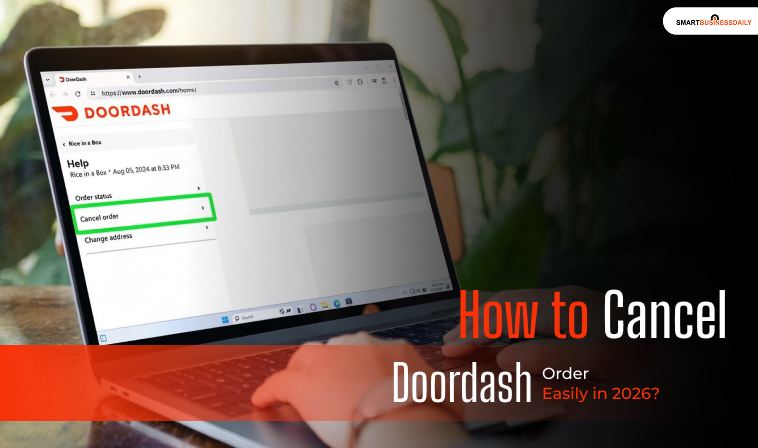
- How To Cancel Doordash Order?
- Before You Cancel: Read This Once
- Doordash App
- Personal Computer
- Timeline
- What Actually Happens After You Tap “Cancel”
- Other Ways To Cancel the DoorDash Orders
- How To Cancel Doordash Order: Best Alternatives
- Real Refund Examples (What I’ve Seen Work)
- Doordash: Customer Service
- Updates To Doordash Cancellation Rules In 2026
- Common Mistakes People Make When Canceling
- Frequently Asked Questions (FAQs):
- Can You Cancel a DoorDash Order After Placing It?
- Why Can’t I Cancel My Doordash Order?
- Do You Get A Refund If You Cancel A DoorDash Order?
- How Long Does A Doordash Refund Take?
- Does Canceling A Doordash Order Cost Money?
- Can A Dasher Cancel My Order For Me?
- Is It Better To Cancel Or Report A Doordash Problem?
- Can I Choose Cash Instead Of Doordash Credits?
- What Is The Fastest Way To Cancel A Doordash Order?
Take it from someone who has used DoorDash for years. I used DoorDash almost every day, for example, during busy workdays or late at night. Above all, DoorDash has always worked well for me when plans change suddenly.
At the same time, I have also canceled DoorDash orders more than once. So, I can surely tell you what not to do when you plan to cancel a DoosDash order. Now, the question is, how to cancel Doordash order easily. Let me tell you how to avoid problems during cancellation.
The problem is not finding the cancel button. The real confusion starts with refunds. For example, when you get one, how much do you get back? Again, why can two people cancel around the same time and get very different results?
Let’s keep away from the marketing talk. We will focus on just what actually happens inside the app, based on real use and current platform behavior.
If you want to cancel smart and avoid losing money, start here.
How To Cancel Doordash Order?
Suppose you are alone and give an order from DoorDash. Suddenly, you remember there will be a dinner plan waiting for you. So you may need to cancel your order. But if there is no option to do that, what will happen?
The good news is that you can cancel your DoorDash order at any time. There’s some other good news: you can get a refund after canceling your order. Here are the ways to cancel your order.
Before You Cancel: Read This Once
I’ve canceled DoorDash orders more times than I can count.
And here’s the truth.
Canceling fast matters more than canceling correctly.
If you’re still deciding whether to cancel or wait, pause for ten seconds and check two things in your app:
- Has the restaurant accepted the order?
- Has a Dasher been assigned?
That’s it. That single moment decides your refund.
Once a restaurant confirms, money starts moving. Once a Dasher is assigned, time starts ticking. DoorDash isn’t being harsh here. They’re covering real costs.
I learned this the hard way.
One night, I waited too long. The Dasher was already nearby. I canceled anyway. No refund. No argument.
If your food is already cooking or rolling, cancel only if you’re truly sure. If not, waiting may save you more money than rushing.
Doordash App
If you are using a smartphone and want to know how to cancel an order on DoorDash, then you need to follow these steps:
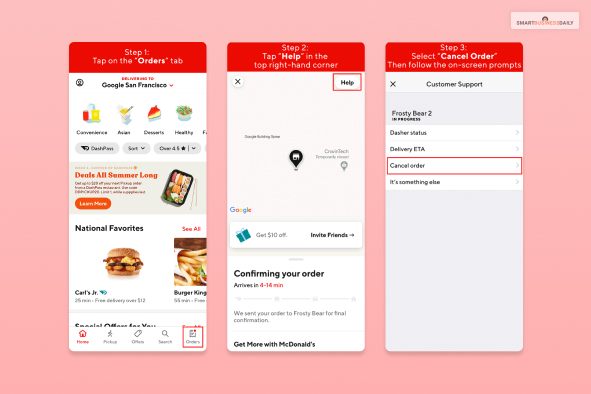
- First, log in to your DoorDash portal.
- There, you will find the option “Orders.” Click on that.
- There will be a drop-down menu. You need to find “View Order” and click on that. You will find this option at the top of the menu.
- There will be an option called “Help.” To open the Support Menu, click it.
- You will see three options: a zero, a partial, or a full refund.
- If you are happy with the refund and the cancellation terms, click “Cancel Order.”
- Ta-Da, you have successfully canceled your DoorDash order.
Personal Computer
When you are thinking about “How to cancel Doordash order?” from your personal computer, follow these steps:
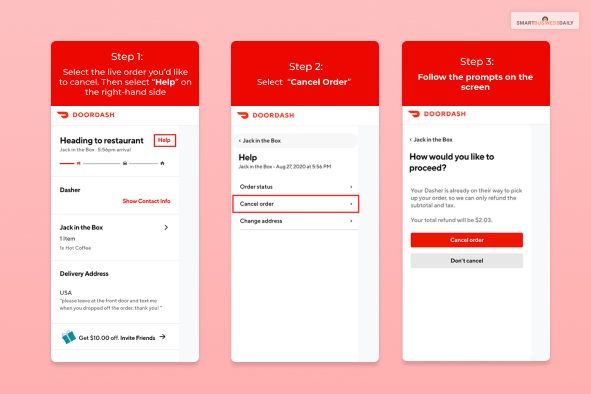
- First, open the DoorDash portal on your website. There you will find a hamburger menu in the left-hand corner of your landing page.
- From the drop-down menu, you need to select “Orders.” You will find this option at the top of the list.
- Choose the order that you want to cancel.
- Now, click on “Cancel Order.”
- And your Doordash order was canceled.
Timeline
Now that you are aware of how to cancel an order on Doordash, let’s see the timeline and different cases of refunds.
You can cancel your order at any time before it is delivered. But there are different eligibility requirements for a refund. It totally depends on the status.
Sometimes the merchant confirms, but there are Dashers to assign. There are different refund scenarios you can find in DoorDash’s Terms & Conditions for consumers. One of the most important things is that your order must not be too late.
| Status (Restaurant) | Dasher | Refund |
| Not Confirmed | Not Assigned | Full |
| Not Confirmed | Assigned | Partial |
| Confirmed | Not Assigned | Partial |
| Confirmed | Assigned | No Refund |
What Actually Happens After You Tap “Cancel”
When you cancel an order, it doesn’t just vanish. Behind the scenes, DoorDash checks three things at once:
- Restaurant status
- Dasher movement
- Payment timing
If the kitchen has started prepping food, the restaurant still gets paid.
If a Dasher has driven even a short distance, they may get partial pay.
That’s why refunds sometimes look inconsistent. However, they’re not random.
Once, my order showed “preparing” for over ten minutes. No driver yet. I assumed I’d get a full refund. I didn’t. Why? The restaurant had already confirmed the ticket internally.
The app doesn’t show that detail. But it matters.
If you ever feel unsure about the refund amount, open chat support and ask them to explain which step your order has reached. They’ll usually tell you.
Other Ways To Cancel the DoorDash Orders
There are a lot of queries that different customers ask apart from “How to cancel Doordash order?”. Here, we try to provide a comprehensive overview. We won’t limit ourselves to answering only how do I cancel Doordash order, so that you will have a basic understanding of canceling orders on DoorDash.
How To Cancel Doordash Order: Best Alternatives
- You can cancel your order at any time if you haven’t received your order. But to get a refund, you need to act fast. Suppose you are trying to cancel the order when the driver is outside your home. Then there will be no refund at all.
- In most cases, a dasher has no right to cancel an order. If there is an issue at the restaurant with picking up the order, the driver will contact customer support and ask the customer to cancel the order.
- When it comes to canceling an order on DoorDash, timing is crucial. If you can cancel the order before the restaurant confirms it, you will receive a full refund.
- And if a Dasher is assigned, you will receive a partial refund. The reason behind it is that DoorDash has to pay the restaurant and the Dasher.
- There are certain rights that you have regarding canceling an order. There are cases where you will get a full refund. Here are some cases.
- You get someone else’s .order
- Missing any item
- Late arrival of your order
- The food preparation is incorrect
- Delivery time extends
- Quality issues
- Excluding full and partial refunds, there are other cases. Sometimes, Doorcash gives you credits instead of refunds.
- The credit will work like coupons. You can use these coupons in your future orders. You can also use the credits to tip the DasSupposers.
- Suppose there is a problem with your delivery, such as your order being canceled, delayed, missing items, or any other unexpected issue. In these cases, DoorDash will redeliver your order.
- If you are applying for a refund, DoorDash will ask you how you want your refund. You can get your refund in credit or cash.
Real Refund Examples (What I’ve Seen Work)
Not every refund plays out the same. Here are real patterns I’ve noticed.
Full refund, no drama: I canceled within two minutes. The restaurant hadn’t confirmed. Money came back fast.
Partial refund: Restaurant confirmed—no Dasher. I lost a small fee, but most was refunded.
No refund at all: Dasher was already near my place. Canceling at that point was basically my call.
Credits instead of cash: Late delivery. The food was cold. I asked politely through chat. Credits were offered first. I accepted because I knew I’d order again soon.
If you want cash back instead of credits, say so clearly. Don’t assume. DoorDash often defaults to credits because they’re faster.
Doordash: Customer Service
Applying on smartphones or computers is not an option. You can also call customer service by dialing 855-973-1040.
Over the phone, you can explain your situation. If you are following this process, the refund will take time. If there is a high call volume, then your call may be suspended.
There is also live chat support on DoorDash. You can chat with customer support to discuss your situation. You just need to go to the Contact Us page and find the chat icon. Chat support is the best way to get a refund if customer support is busy.
Updates To Doordash Cancellation Rules In 2026
DoorDash hasn’t changed the core cancellation logic, but enforcement is tighter now.
From what I’ve seen recently:
- Restaurants confirm faster
- Dashers are assigned more quickly
- Refund windows close sooner
This means the grace period feels shorter than before. Not officially. Practically.
If you rely on lastminute cancellations, that approach doesn’t work well anymore. Acting early is no longer optional. It’s necessary.
Common Mistakes People Make When Canceling
These mistakes cost people money. I’ve made some myself.
Waiting too long to decide: Hesitation is expensive. That’s why I recommend that you check the order status quickly.
Assuming Dashers can cancel for you: They usually can’t. If the app doesn’t offer cancellation, support is your only route.
Accepting credits without thinking: Credits expire. However, refunds don’t. So, choose what actually helps you.
Canceling instead of reporting an issue: If your food is late or wrong, reporting the problem often gives a better outcome than canceling alone.
These small choices can actually make a big impact. So, make your choice wisely.
Frequently Asked Questions (FAQs):
Here are some questions and answers. You can find the questions interesting.
Can You Cancel a DoorDash Order After Placing It?
Yes, you can cancel a DoorDash order at any time before delivery, but a refund depends on the order status. If the restaurant has not confirmed the order, you usually receive a full refund.
Why Can’t I Cancel My Doordash Order?
You may not see the cancel option if the restaurant has confirmed the order or a Dasher has already been assigned. At that point, DoorDash may block cancellation or offer only a partial refund.
Do You Get A Refund If You Cancel A DoorDash Order?
It depends on timing.
- Full refund: Restaurant not confirmed, and no Dasher assigned
- Partial refund: Restaurant confirmed or Dasher assigned
- No refund: Dasher is already near delivery, or the order is almost complete
How Long Does A Doordash Refund Take?
Most DoorDash refunds take 5–10 business days to appear in your bank account. Credits, if offered instead, usually show up immediately in the app.
Does Canceling A Doordash Order Cost Money?
There is no cancellation fee, but you may lose part or all of your payment if the order is already in progress. DoorDash uses that amount to cover restaurant and Dasher costs.
Can A Dasher Cancel My Order For Me?
No, Dashers usually cannot cancel orders on behalf of customers. If there is a problem, the Dasher may contact support, but the cancellation must come from you or DoorDash.
Is It Better To Cancel Or Report A Doordash Problem?
If your food is late, missing items, or incorrect, reporting the issue often works better than canceling. In many cases, DoorDash offers credits, redelivery, or a partial refund without canceling the order.
Can I Choose Cash Instead Of Doordash Credits?
Yes, but you must select or request it. DoorDash often offers credits first, so if you want a refund to your original payment method, make that clear during support chat.
What Is The Fastest Way To Cancel A Doordash Order?
The fastest way is to open the DoorDash mobile app, open your order, tap “Help,” and select “Cancel Order.” Live chat is faster than phone support if the app doesn’t offer it.




Related Articles


Comments Are Closed For This Article