







Top Data Security Threats Facing Small Businesses
5 Mins Read
Published on: 11 November 2022
Last Updated on: 02 September 2026
- Top Data Security Threats That Small Businesses Are Facing In 2026:
- 1. Phishing And Social Engineering:
- 2. Denial Of Service (DoS) And Distributed Denial Of Service (DDoS):
- 3. Malware And Ransomware:
- 4. SQL Injection:
- 5. Physical Data Exposure And Dumpster Diving:
- Data Security Threats: How Can Small Businesses Protect Their Data?
- Protecting A Small Business Requires More Than Cybersecurity Software:
Small businesses may not hold the same volume of data as large corporations, but they still handle valuable information every day – and face potential data security threats. Customer details, employee records, financial documents, login credentials, and business data can all become targets for cybercriminals.
Moreover, the threats aren’t limited to sophisticated hacking attempts.
Phishing emails, malware, ransomware, website vulnerabilities, and denial-of-service attacks can disrupt operations and expose sensitive information. Even something as simple as throwing confidential documents in the trash can create a security risk.
This is why protecting a small business requires more than antivirus software or a secure network. Digital security, employee awareness, access controls, backups, and secure document disposal all play a role in protecting sensitive information.
In this context, today, we will breakdown the top data security threats that small businesses can face in 2026, highlighting each type of security breach in detail.
Stay tuned.
Top Data Security Threats That Small Businesses Are Facing In 2026:
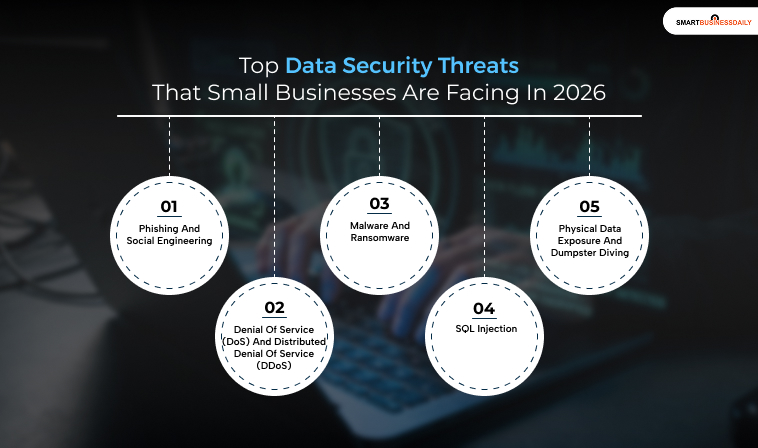
Understanding the most common threats is the first step toward building a stronger security strategy. Here are the key cybersecurity and information-security risks small businesses should be prepared to address.
1. Phishing And Social Engineering:
Phishing is one of the most common forms of social engineering. It involves deceptive messages designed to persuade people to reveal sensitive information, download malicious software, transfer money, or give an attacker access to an account.
Email remains a common delivery method, but phishing attacks can also arrive through text messages, social media, messaging apps, and other communication channels.
Attackers often impersonate trusted organizations, colleagues, suppliers, or service providers. A message may claim that there is suspicious activity on an account or that the recipient needs to verify their information.
A phishing email may use a convincing sender name while directing the recipient to a fraudulent website. It may also use a different reply-to address or a domain that closely resembles a legitimate one.
Employees should avoid clicking unexpected links or opening suspicious attachments. They should also verify unusual requests through a separate communication channel, particularly when a message asks for passwords, financial information, or payments.
2. Denial Of Service (DoS) And Distributed Denial Of Service (DDoS):
A denial-of-service attack attempts to make a website, server, network, or online service unavailable by overwhelming it with traffic or requests.
A DoS attack generally originates from a single source, while a distributed denial-of-service attack uses multiple sources. Modern DDoS attacks can involve large networks of compromised devices or other distributed infrastructure.
For a small business that depends on its website or online services, a successful DDoS attack can disrupt operations and prevent customers from accessing important services.
Some attackers also use DDoS attacks as part of extortion campaigns, threatening to continue the attack unless the victim pays a ransom. However, not every DDoS attack involves ransom demands.
In addiitonally, businesses that depend heavily on online availability should work with their hosting provider, internet service provider, or security team to understand appropriate DDoS protection and mitigation options.
3. Malware And Ransomware:
Malware is a broad term for malicious software designed to compromise computers, networks, accounts, or data. It includes several types of threats, including ransomware, spyware, Trojans, and other malicious programs.
Attackers can deliver malware through phishing messages, malicious downloads, compromised websites, vulnerable software, infected devices, or stolen credentials.
The consequences vary depending on the type of malware. Also, an attack may steal credentials, monitor activity, exfiltrate sensitive information, disrupt systems, or prevent employees from accessing important files.
Ransomware is particularly disruptive because it can encrypt files or otherwise prevent access to business systems. Attackers may then demand payment in exchange for restoring access or withholding stolen information.
Small businesses can reduce their exposure by keeping software and operating systems updated, using appropriate security controls, limiting administrative privileges, training employees, and maintaining regular backups.
Backups should also be tested periodically to ensure that the business can actually restore its data after an incident.
4. SQL Injection:
SQL injection is a web application vulnerability that occurs when an application improperly incorporates untrusted user input into database queries.
An attacker may exploit the vulnerability to manipulate database queries and access information that the application should not expose. Depending on the vulnerability and the application’s configuration, an attacker may also be able to modify or delete data.
SQL injection isn’t limited to website search boxes. As a result, any vulnerable application feature that passes untrusted input to a database can potentially create an injection risk.
Businesses that operate websites or web applications should use secure development practices, parameterized queries, appropriate input validation, access controls, and regular security testing to reduce the risk of SQL injection.
5. Physical Data Exposure And Dumpster Diving:
Cybersecurity doesn’t end when information is printed on paper.
Businesses may have physical records containing names, addresses, contact details, financial information, employee records, customer information, contracts, or other confidential data.
Throwing these documents into ordinary trash can expose them to unauthorized individuals. Criminals may search discarded materials for information that can be used for fraud, identity theft, social engineering, or other crimes.
Businesses should establish a document-retention policy that specifies how long different types of records should be kept and how they should be destroyed when they are no longer required.
Additionally, for sensitive documents, secure shredding can provide a safer alternative to ordinary disposal. Mobile shredding services can be particularly useful for businesses that need to destroy large quantities of confidential documents on-site.
Data Security Threats: How Can Small Businesses Protect Their Data?
Small businesses don’t need to wait for a security incident before improving their defenses. Moreover, a practical security program should include several basic measures:
- Enable multi-factor authentication on important accounts.
- Use strong, unique passwords and consider a password manager.
- Keep operating systems, applications, plugins, and security software updated.
- Maintain regular backups of important business data.
- Test backups to make sure data can be restored.
- Limit administrator privileges to employees who genuinely need them.
- Train employees to recognize phishing and other social-engineering attacks.
- Secure sensitive information both digitally and physically.
- Establish clear policies for retaining and securely destroying confidential documents.
- Review access granted to vendors, contractors, and third-party services.
- Monitor important accounts and systems for unusual activity.
- Create an incident-response plan so employees know what to do if an attack occurs.
Protecting A Small Business Requires More Than Cybersecurity Software:
Cybersecurity isn’t limited to installing antivirus software or protecting a company’s network. Sensitive information can exist across email accounts, cloud platforms, databases, employee devices, paper records, and discarded documents.
Also, to be honest, data security threats are common. A strong security strategy addresses each of these areas.
By combining technical safeguards with employee training, access controls, reliable backups, and secure document-destruction practices, small businesses can reduce opportunities for cybercriminals and respond more effectively when something goes wrong.
Additionals:




Related Articles



Comments Are Closed For This Article