








Negative SEO: What It Is, Types, Signs, And How To Protect Your Website
11 Mins Read
Published on: 30 July 2022
Last Updated on: 17 August 2026

- What Is Negative SEO?
- Does Negative SEO Actually Work?
- 7 Common Types Of Negative SEO:
- 1. Website Hacking:
- 2. Toxic Or Manipulative Backlinks:
- 3. Content Scraping And Duplication:
- 4. Spam Attacks:
- 5. Unauthorized Content Changes:
- 6. Fake Reviews And Reputation Attacks:
- 7. Fake Pages, Redirects, And URL Manipulation:
- How To Tell If You Are Experiencing Negative SEO?
- 1. Sudden, Unexplained Ranking Changes:
- 2. Unexpected Backlinks:
- 3. Pages You Did Not Create:
- 4. Unexpected Redirects:
- 5. Strange Search Results:
- 6. Unusual Changes In Google Search Console:
- How To Fight Back And Avoid Those Attacks?
- 2. Check Google Search Console
- 3. Backlinks audit
- 4. Check Webmaster Guidelines
- 5. See If All Content Functions As Intended
- 6. Remove All Duplicates
- 7. Report Bots That Spam in Your Comments
- 8. Improve Your Website's Security
- What You Should Not Do After A Suspected Negative SEO Attack?
- Negative SEO Checklist:
Negative SEO refers to attempts to harm another website’s search visibility, reputation, or performance through manipulative tactics.
The idea sounds straightforward: a competitor or malicious actor deliberately creates problems for your website so that it loses rankings, traffic, customers, or trust.
But negative SEO is often misunderstood.
A sudden drop in ranking does not automatically mean someone attacked your website. Search rankings can change due to algorithm updates, technical issues, stronger competitors, content quality issues, indexing changes, or shifts in search demand.
Also, Google says it works hard to prevent competitors from negatively affecting another site’s rankings. In many cases, Google’s systems can simply ignore spammy signals rather than passing the damage on to the targeted website.
That does not mean every negative SEO threat is harmless. A hacked website, injected spam, unauthorized content changes, malicious redirects, or reputation attack can create real problems.
The key is knowing what to look for, how to investigate it, and what action to take. And that is precisely why I’m here – to do a comprehensive breakdown of negative SEO, with my primary focus on how to protect your website from it.
Stay tuned.
What Is Negative SEO?

Negative SEO is the use of manipulative or harmful tactics intended to damage another website’s search performance, reputation, or ability to attract visitors. Some attacks target ranking signals. Others target the website itself.
On that note, some of the most common examples include:
- Building manipulative backlinks to a competitor’s website
- Hacking a website and inserting spam or malicious content
- Creating unauthorized pages or redirects
- Scraping and republishing another site’s content
- Flooding forms and comment sections with spam
- Manipulating website content without permission
- Creating fake reviews or misleading mentions
- Attempting to damage a brand’s online reputation
However, not every one of these activities will cause a ranking penalty. And that distinction matters.
For example, someone can create thousands of low-quality links pointing to your website. That may look alarming in a backlink report, but it does not automatically mean Google will lower your rankings. Google says its systems are designed to prevent other site owners from harming your search performance through links.
Before assuming negative SEO, investigate what actually changed.
Does Negative SEO Actually Work?
Sometimes, but not always in the way people expect.
Google has specifically stated that it works to prevent competitors from negatively affecting other websites’ rankings. Its systems can detect and discount many forms of link spam and other manipulative signals.
That means a competitor cannot simply point a few hundred bad backlinks at your website and automatically make your rankings disappear.
However, there are other forms of attack that can cause genuine problems. A compromised website can contain spam pages, malicious redirects, hidden links, or malware.
Moreover, unauthorized changes to important pages can also affect how search engines understand and index a site. Google provides a dedicated Security Issues report in Search Console for detected hacking and security problems.
So, if your rankings suddenly decline, do not start by blaming a competitor. As a result, you need to start by finding the cause.
Also, check your technical SEO, indexing, Search Console reports, recent website changes, algorithm updates, content performance, and backlink profile before concluding that you are dealing with negative SEO.
7 Common Types Of Negative SEO:
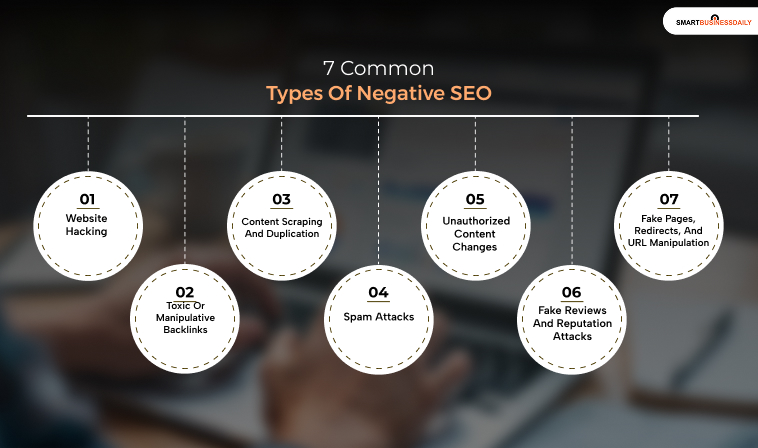
In this section, I’ve covered the 7 main types of negative SEO that you need to know in detail – to simplify matters, I’ve done a comprehensive deep dive of all seven types of negative SEO in detail.
1. Website Hacking:
A hacked website can be one of the most serious forms of negative SEO because the attacker gains access to the site itself. Instead of simply creating external signals, the attacker can make unauthorized changes directly to your website.
So, any compromised site might contain:
- Spam pages
- Hidden links
- Malicious redirects
- Keyword-stuffed content
- Fake pharmaceutical or gambling pages
- Malware
- Unauthorized user accounts
- Altered titles or page content
- Suspicious scripts
Some attacks are designed specifically to manipulate search results. Others are intended to distribute malware, steal information, or redirect visitors.
As a result, if you suspect your site has been hacked, check Google Search Console’s Security Issues report and investigate the affected pages.
Google recommends cleaning the compromised site, closing the security vulnerability, and requesting a review after the problem has been fixed.
Additionally, a security breach should be treated as a security problem first and an SEO problem second.
2. Toxic Or Manipulative Backlinks:
Backlink attacks are probably the most commonly discussed form of negative SEO.
So, the idea is simple – Someone creates a large number of low-quality, irrelevant, or manipulative links pointing to your website in an attempt to make your backlink profile look unnatural.
These links might come from:
- Automatically generated websites
- Spam directories
- Irrelevant foreign-language pages
- Comment spam
- Link networks
- Pages created solely to generate links
But there is an important distinction: A suspicious backlink does not automatically mean your website has been penalized.
Google says its systems work to prevent competitors from harming a site’s rankings through links, and most website owners do not need to worry about disavowing links they did not create.
Do not disavow every backlink that looks poor. Instead, investigate the pattern and determine whether there is an actual issue that requires action.
3. Content Scraping And Duplication:
Someone may copy your articles, product descriptions, images, or other content and publish them on another website. This can be frustrating, but copied content does not automatically result in a penalty for the original publisher.
Google explains that duplicate content is common and that its systems attempt to determine which version is the original or canonical page. Also, the search engine giant states that duplicate content itself is generally not a violation of its spam policies.
That means you should not panic simply because you find your article published somewhere else.
Moreover, the situation deserves closer attention if:
- The copied version is ranking above your original.
- The scraper is creating large numbers of pages.
- Your content has been republished without permission and is causing a copyright issue.
- The copied material is affecting your site’s reputation or traffic.
- The copied pages are being used to manipulate search results.
Also, Google’s systems are designed to identify original content, but you should still monitor important content and take appropriate action when necessary.
4. Spam Attacks:
Spam attacks can target the areas of your website where visitors can submit information.
In this context, the most common targets include:
- Blog comments
- Contact forms
- Registration forms
- Review forms
- User-generated content
- Forum posts
An attacker may submit hundreds of automated messages containing irrelevant links or promotional content.
Moreover, besides creating a poor user experience, uncontrolled spam can make your website look neglected and may create security or moderation problems.
So, you can consider using spam filters, CAPTCHA where appropriate, moderation tools, rate limits, and other controls to reduce automated submissions.
5. Unauthorized Content Changes:
Another form of attack involves changing the content on your website without your permission. So, any attacker who gains access to your CMS could modify:
- Page titles
- Meta descriptions
- Headings
- Internal links
- Body content
- Images
- Structured data
- Canonical tags
- Robots directives
- Existing URLs
Also, they may insert hidden text, links, or redirects – and these changes can be difficult to notice if you manage a large website with hundreds or thousands of pages.
Additionally, regular crawling and change monitoring can help you identify unexpected changes before they become larger problems.
6. Fake Reviews And Reputation Attacks:
Negative SEO is not limited to traditional ranking signals. Someone may attempt to damage a business by creating fake reviews or misleading mentions across third-party platforms.
For a local business, this could include a sudden series of suspicious negative reviews. For an online brand, it could involve misleading posts, fake complaints, or impersonation.
The SEO impact varies, but the reputation impact can be significant.
So, monitor important review platforms and brand mentions, document suspicious activity, and use the platform’s reporting or appeal process when appropriate.
Also, do not assume that every negative review is fake simply because it is unfavorable. Look for unusual patterns and verifiable evidence before reporting anything.
7. Fake Pages, Redirects, And URL Manipulation:
Attackers may create unauthorized URLs or redirect existing pages to destinations that have nothing to do with your website. For example, a compromised website might suddenly contain hundreds of pages targeting unrelated search terms.
Moreover, you might notice URLs involving:
- Pharmaceutical terms
- Gambling
- Adult content
- Foreign-language spam
- Promotional keywords
- Random strings and automatically generated text
Unexpected redirects can be particularly serious because they can affect both users and search engines. As a result, if you discover pages or redirects you did not create, investigate your website’s security before treating the issue as a normal SEO problem.
How To Tell If You Are Experiencing Negative SEO?
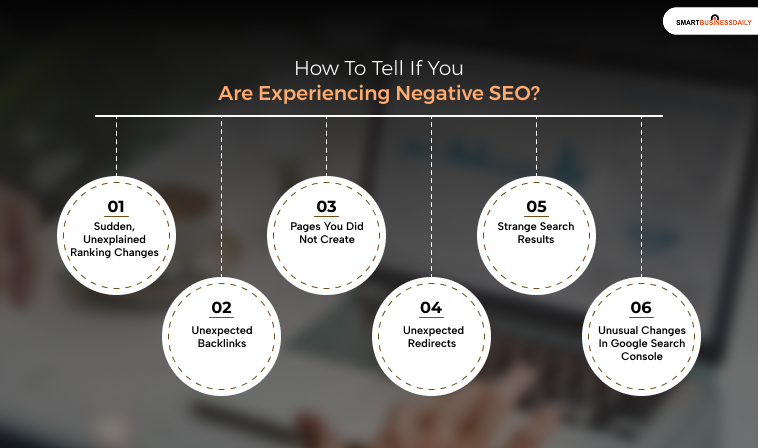
A drop in ranking alone is not enough to prove an attack. Instead, look for several unusual changes happening at the same time to help you understand whether or not your site is experiencing negative SEO
1. Sudden, Unexplained Ranking Changes:
A significant decline can warrant investigation, but it may have many possible causes.
Before blaming negative SEO, check:
- Recent Google algorithm changes
- Technical SEO problems
- Indexing changes
- Lost backlinks
- Competitor improvements
- Content quality
- Search intent changes
- Manual actions
- Security issues
Google itself recommends looking at which pages and searches were affected when diagnosing a decline in search performance.
2. Unexpected Backlinks:
A sudden increase in strange backlinks deserves investigation. But do not assume every link is an attack.
Instead, look at:
- When the links appeared
- Whether the links use suspicious anchor text
- Whether the links come from obvious spam networks
- How many domains are involved
- Whether there is evidence of a coordinated campaign
- Whether Google has reported any manual action
Also, the existence of bad-looking links alone is not proof that they are hurting your rankings.
3. Pages You Did Not Create:
This is a stronger warning sign.
So, if your site suddenly contains pages you never published, investigate immediately. Additionally, check your CMS, server, users, plugins, themes, and hosting environment for unauthorized access.
4. Unexpected Redirects:
Check whether important pages suddenly redirect to unrelated URLs. Moreover, unexpected redirects can indicate a compromised website, particularly when the destination has nothing to do with the original page.
5. Strange Search Results:
Search your own brand and important site URLs periodically.
In this context, look for:
- Spam pages
- Strange titles
- Unexpected indexed URLs
- Foreign-language content
- Malware warnings
- Pages you did not create
These signs do not always indicate negative SEO, but they are worth investigating.
6. Unusual Changes In Google Search Console:
Search Console can help you identify problems with:
- Search performance
- Indexing
- Security
- Manual actions
- Links
Use it as one source of evidence rather than relying on a single ranking tracker.
How To Fight Back And Avoid Those Attacks?

Unfortunately, negative SEO cases are very challenging to prove. Moreover, the attackers know what their anonymity means and hide their faces. So, it is not that easy to take any legal action.
You can only try to find the root of the problem and fix it as fast as possible. That might take a lot of time, but you will eventually succeed using the right tools. And here is a condensed SEO checklist that will help you focus on all potential issues faster.
1. Crawl The Website regularly
The website crawling process implies analyzing every page to find technical issues. That is how you will spot the problem at its very beginning. The most convenient way to do that is using an SEO website crawler. It detects even the tiniest changes on your website.
2. Check Google Search Console
The platform exists to help you track your website’s progress and spot any issues. Google will send you messages about penalties or other problems that need to be addressed asap.
3. Backlinks audit
If you have never checked your backlinks, now is the time to do that. Go to Google Search Console and find the “Links” category. There, you will see the list of all links that refer to your website. Check if there are any new and suspicious ones. If yes, then you have to deal with a negative SEO attack.
4. Check Webmaster Guidelines
Google’s Webmaster Guidelines exist for a reason. They are full of important recommendations that will help you make your website better. Besides, you will find some advice on what to do if you get attacked.
5. See If All Content Functions As Intended
When someone tries to manipulate your content, they usually do not know how to do that properly. As a result, something might look or function not as intended. So, check all your content to ensure it is placed correctly and functions smoothly.
6. Remove All Duplicates
The more duplicate content you have, the lower your SERP position. So, use a Plagiarism checker to find all identical or similar pieces and delete them.
7. Report Bots That Spam in Your Comments
If you have a comments section, you are probably familiar with spam messages. The best thing you can do is report those bots and IP addresses to Google. Moreover, do not neglect to filter irrelevant comments. Contact the support of a review hub so that they can erase all bots. And there might be other “reviews” on independent platforms.
8. Improve Your Website’s Security
A strong website is a well-protected one. So, ensure your website is safe from attacks by investing in proper security. The most common methods are SSL certificates, two-factor authentication, and website monitoring.
What You Should Not Do After A Suspected Negative SEO Attack?
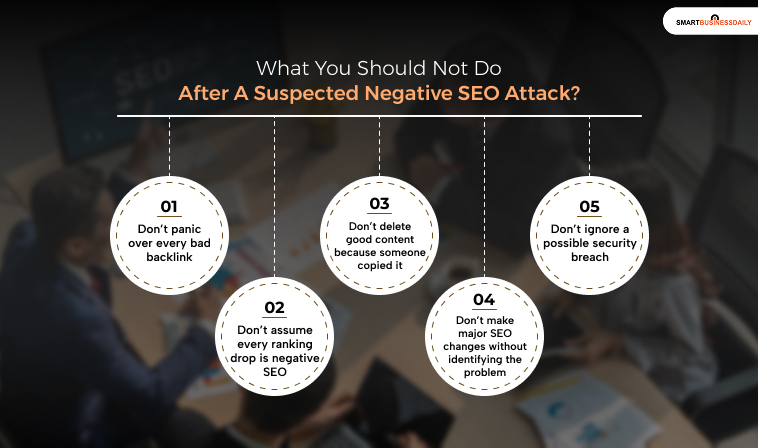
The first mistake is often reacting too quickly.
1. Don’t panic over every bad backlink: Google says most sites do not need to use the disavow tool simply because they see unwanted links.
2. Don’t assume every ranking drop is negative SEO: Investigate algorithm changes, technical issues, indexing, content, competitors, and search demand first.
3. Don’t delete good content because someone copied it: Scraped content does not automatically mean your original page will be penalized. Google has systems for handling duplicate and copied content.
4. Don’t make major SEO changes without identifying the problem: Changing URLs, deleting pages, removing backlinks, or rewriting large sections of a website can make diagnosis harder.
5. Don’t ignore a possible security breach: If you find unauthorized pages, redirects, users, or scripts, treat the situation as a security issue and investigate immediately.
Negative SEO Checklist:
So, here’s my checklist when something unusual happens to your website – you can use it if you are new in the SEO industry, considering such unusual activities usually end up overwhelming even the best professionals.
- Check Google Search Console.
- Review Manual Actions.
- Review Security Issues.
- Compare recent organic traffic with previous periods.
- Check affected pages and queries.
- Look for unexpected indexed URLs.
- Crawl the website.
- Review recent website changes.
- Audit unusual backlink patterns.
- Check for unauthorized redirects.
- Review CMS users and permissions.
- Check plugins and software for vulnerabilities.
- Review suspicious reviews or brand mentions.
- Secure the website if necessary.
- Document the evidence.
- Take action based on the specific problem.
Negative SEO is real, but it is also widely misunderstood.
A competitor cannot simply point a few bad links at your website and automatically destroy your Google rankings. Google’s systems are designed to ignore many forms of manipulative external activity.
The more serious risks often come from attacks that affect the website itself. So, it’s best to watch your Search Console data.
Crawl your site regularly. Keep your software updated. Protect administrator accounts. Maintain backups. Investigate unusual changes before reacting to them. And most importantly, do not mistake every ranking problem for negative SEO.
Find the cause first. Then fix the problem that actually exists.
Additionals:
- Do You Really Need Backlinks For Your Business?
- Best Tactics To Improve Search Engine Positioning
- Why Digital Marketing Is Important For Businesses?
- Everything You Need to Know About Search Engine Optimization



Related Articles



Comments Are Closed For This Article