







How To Build An Ideal Remote Work Setup For Maximum Efficiency And Productivity?
13 June 2026
9 Mins Read
- Fundamentals For An Ideal Remote Work Setup: What Matters The Most?
- The Core Infrastructure (Tech-Stack) For A New-Age Remote Work Setup
- 1. Connectivity Is More Than Just A Signal
- 2. The Cloud Is Your Workplace
- 3. Identity Is The New Location
- 4. The VPN Challenge
- 5. Real Mobility Needs Flexible Networks
- 6. Latency Is A Key Issue
- 7. Hardware Is Important
- What Are The Digital Ergonomic Factors To Keep In Mind?
- 1. Chair And Posture Recommendations
- 2. Monitor Placement
- 3. Eye Comfort Practices
- 4. Encouraging Movement
- What Should You Do About The Lighting?
- What Are Some Best Practices For WFH In 2026?
- Efficient Remote Work Setup: Mistakes To Avoid
- 1. The Statue Trap: Relying On Static Posture
- 2. Miscalculating Desk Height: The Hunch And Shrug
- 3. The Neck Crane Effect: Poor Monitor Alignment
- 4. Underestimating Load Capacity And Stability
- 5. Neglecting Cable Safety: The Rat's Nest Risk
- 6. The All-or-Nothing Sit-Stand Rhythm
- 7. Ignoring The Depth Deficit
- An Efficient Remote Work Setup Creates The Roadmap For Maximum Productivity
The transition from a on-site 9-5 corporate culture to a remote architecture requires more than just a system and a stable Wi-Fi connection.
Of course, you want to get up, slip on your favorite slippers, brew a pot of coffee, and walk just a few steps to your home office.
This is basically the new-age American Dream. However, there are important considerations to keep in mind.
For some individuals, remote work can lead to constant distractions and temptations.
Additionally, it can also cause a lack of interaction with colleagues. Then, this can affect productivity and overall job satisfaction.
Therefore, if you are looking to create an effective remote work setup, you must ensure that this setup does the following:
- Enhances Productivity
- Improves Well-Being
- Ensures You Present Yourself Professionally On Camera
This comprehensive guide for 2026 is designed to provide practical insights.
Also, these will help you regardless of whether you’re working from a small studio apartment or transitioning between different cafés.
Fundamentals For An Ideal Remote Work Setup: What Matters The Most?
When planning a remote work setup, make sure it optimizes day-to-day performance.
Therefore, for this, it is very important to invest in high-quality equipment.
What are the key items? It includes a reliable laptop and an external monitor (or two).
Additionally, you need an ergonomic chair and reliable high-speed internet.
To support their distributed teams, many companies take proactive measures by shipping equipment directly.
Or, may a times, they also choose to offer stipends. In addition, they even reimburse employees for essentials like:
- Internet Service
- Software
Each of these approaches has proven effective.
Moreover, the key is to ensure that employees are equipped with the tools they need to work efficiently, regardless of their location.
When considering a laptop replacement, it’s important to focus on features like battery life and AI-assist NPUs.
These have become increasingly common this year. Additionally, these significantly enhance on-device productivity.
The Core Infrastructure (Tech-Stack) For A New-Age Remote Work Setup
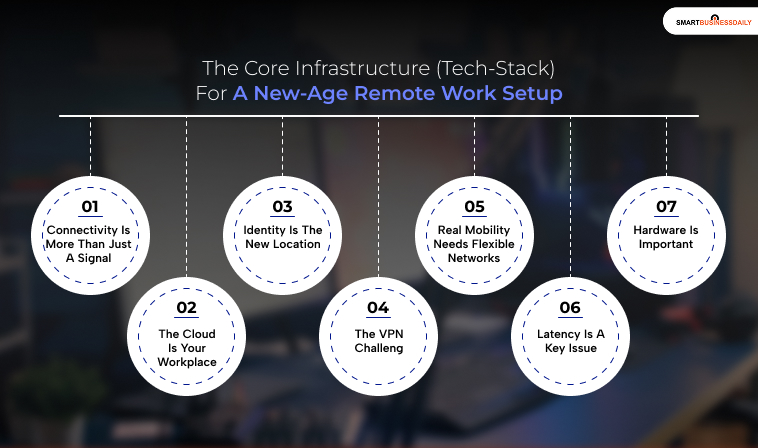
To really grasp remote work, you need to look beyond just Wi-Fi. It’s about everything that supports it.
1. Connectivity Is More Than Just A Signal
Wi-Fi is just the last step in a bigger network. It’s how you connect, not the whole system.
When you join a call or use an application, your data travels through local routers, internet service providers, undersea cables, and cloud networks.
All these layers can slow things down or create issues. That’s why two networks with full bars can behave so differently.
One might have a smooth data path, while the other could be congested or poorly set up.
For remote workers, especially those on the move, this variation is always a factor.
You’re not just depending on a connection; you’re depending on the quality of the route your data takes.
2. The Cloud Is Your Workplace
Your office isn’t a building anymore. It’s a system spread out across the cloud.
Every tool you use, from document editing to project management, relies on cloud services like Google Workspace and Microsoft 365.
They’re not just apps; they’re where your work actually lives.
This shift means reliability looks different now. In a traditional office, you mainly relied on local systems.
Now, your ability to work hinges on global uptime and the servers’ locations.
The further you are from a cloud server, the slower your tools feel. Even small delays can add up, especially when you’re collaborating.
Remote work isn’t just about using tools; it’s about using them effectively.
3. Identity Is The New Location
In an office, access was tied to your physical location. Being inside meant you were trusted, while being outside meant restrictions.
Remote work flips that idea. Now, your identity is what matters.
Authentication systems and single sign-on tools dictate whether you can work. If they fail, you can’t access anything, no matter how good your internet connection is.
This means remote work is closely tied to security measures. Balancing convenience and control is key, and users often notice this balance only when there’s a problem.
4. The VPN Challenge
Many companies still use virtual private networks (VPNs) for remote access.
While VPNs create secure connections to company systems, they can also slow things down.
Traffic is often routed through centralized gateways, which can become bottlenecks and increase latency.
Modern systems are moving toward zero-trust models, where access is granted on a per-request basis rather than through a single tunnel.
However, this change isn’t happening evenly.
Many remote workers are still caught in a hybrid setup where some tools are cloud-based, while others rely on older access methods.
This inconsistency can be frustrating. Some apps feel fast and modern, while others feel outdated.
5. Real Mobility Needs Flexible Networks
Remote work promises location independence, but it can be challenging. Moving between different networks can create problems.
Public Wi-Fi may be unreliable or unsafe. Getting local SIM cards involves setup and verification, and often requires you to be physically present.
Roaming charges can be high and unpredictable.
This is where new connectivity options are important.
An international e-SIM lets you use mobile data in different countries without changing physical cards. It reduces one layer of complexity.
More importantly, it gives you backup. If a local network goes down, you can quickly switch to a mobile connection.
This backup can be crucial for attending important meetings without interruption.
Remote work is not just about having a connection; it’s about having choices when that connection fails.
6. Latency Is A Key Issue
Most people think speed is the most important factor. They assume faster internet is always better.
However, for remote work, latency can be more important than speed.
A fast connection with high latency can still feel slow during video calls, remote desktops, or collaborative editing.
Latency depends on distance, routing efficiency, and network congestion, and it’s harder to control. You can’t simply upgrade your plan to fix latency issues.
This is why experienced remote workers focus on having a stable connection instead of just fast speeds.
A consistent connection with predictable latency is usually more valuable than a fast but unreliable one.
7. Hardware Is Important
While it’s easy to focus on networks and software, hardware also plays a crucial role.
Your laptop’s thermal performance affects how well it handles sustained workloads.
Additionally, your webcam and microphone impact how others see and hear you in meetings.
Consequently, your router affects how well your local network can support multiple devices.
Even power reliability matters. In some places, unstable electricity can disrupt work more often than network issues.
The infrastructure for remote work includes physical equipment. Ignoring this can create weak points that show up at inconvenient times.
You May Also Like: Fidzholikohixy: The Best Tool To Make Work Simplified!
What Are The Digital Ergonomic Factors To Keep In Mind?
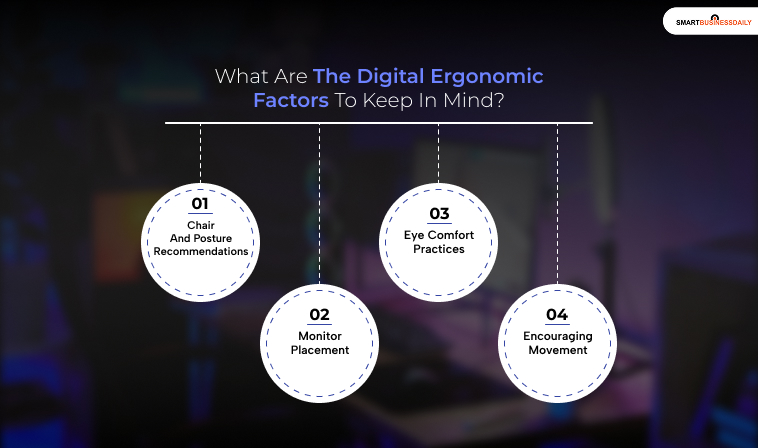
These points are important because if your remote work setup is not ergonomically fit, then it’s not done correctly.
1. Chair And Posture Recommendations
One of the most important things you need to keep in mind while working remotely is to maintain a healthy sitting posture.
According to OSHA’s guidelines, you must keep your elbows close to your body at an angle of approximately 90–120 degrees.
Ensure that your shoulders are relaxed and your lower back is adequately supported.
Your feet should be flat on the floor, and consider using a footrest if needed.
It’s important to keep your wrists straight and aligned with your forearms, with your keyboard and mouse positioned within easy reach for optimal ergonomics.
2. Monitor Placement
Position your monitor at or just below eye level to promote a comfortable viewing angle.
The ideal distance is roughly an arm’s length away, approximately 20–40 inches (50–100 cm).
According to OSHA’s monitor guidelines, this helps for easy reading without the need to lean forward.
3. Eye Comfort Practices
According to the American Optometric Association, to reduce eye strain, follow the 20-20-20 rule
This stands for every 20 minutes, take a break and look at something 20 feet away for at least 20 seconds.
This practice helps to alleviate discomfort during prolonged screen time.
4. Encouraging Movement
To mitigate the adverse effects of prolonged sitting, incorporate standing and walking intervals into your routine.
Many remote workers find it beneficial to use a sit-stand desk or a walking pad to enhance physical activity throughout the day.
What Should You Do About The Lighting?
To effectively illuminate your workspace without causing glare on your screen, consider using a monitor-mounted bar light.
This type of lighting not only conserves desk space but also provides clean, even illumination.
For general office tasks, it’s advisable to aim for lighting levels of approximately 300–500 lux, with higher levels for specific tasks as necessary.
Additionally, it’s beneficial to layer your lighting by combining ambient and task lighting, in line with OSHA’s recommendations for workstation environments.
What Are Some Best Practices For WFH In 2026?
These are some of the extra yet significant tips that will play a major role in making your remote work setup aesthetically pleasing and enhancing productivity.
Let’s see what these are:
- You must really incorporate a low-maintenance plant into your workspace. Plants can significantly lower stress levels and reduce air pollution.
- Listening to music can transform monotonous tasks into enjoyable experiences. When you’re engaged in creative or repetitive work, your favorite songs can boost your mood.
- You can try surrounding yourself with motivational elements such as:
- Family Photographs
- Souvenirs From Memorable Trips
- Inspirational Quotes
- Remote work requires you to have strong and clear boundaries. Therefore, you need to maintain a clear boundary between work and personal life while working from home.
- You need to have a designated storage area for professional documents.
Efficient Remote Work Setup: Mistakes To Avoid
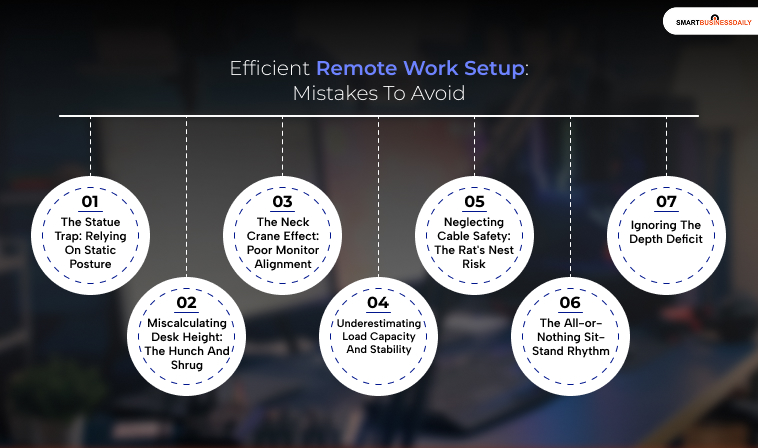
These are very common mistakes. Therefore, you must learn about these to prevent them in your planning:
1. The Statue Trap: Relying On Static Posture
Many people mistakenly believe there’s a single perfect posture for sitting at a desk.
Unfortunately, staying in one position for hours can restrict blood circulation and lead to muscle pain.
Instead of relying on high-end furniture alone, consider a sit-stand desk. which promotes movement throughout your workday—it’s all about breaking those long stretches of sitting.
2. Miscalculating Desk Height: The Hunch And Shrug
It’s a common mistake to assume that a standard desk height of 29 or 30 inches will work for everyone.
For someone around 6’1, this height can lead to either uncomfortable shoulder shrugs or a hunched back.
Using an adjustable desk with memory presets, like the Ark EL Executive Standing Desk, allows you to find your optimal height, keeping your elbows at a relaxed 90-degree angle and reducing strain.
3. The Neck Crane Effect: Poor Monitor Alignment
Monitor placement is often overlooked, yet it’s crucial for posture.
If the screen is too low, it can lead to text neck, putting unnecessary pressure on your neck.
To avoid this, use a gas-spring monitor arm.
This allows for precise adjustments, so your gaze stays comfortably at a neutral level, reducing the risk of cervical strain.
4. Underestimating Load Capacity And Stability
When working from home, it’s easy to underestimate the stability of your desk, especially when fully loaded with equipment.
If your desk wobbles under weight, it can be distracting and cause premature wear on the motor.
A desk with its dual motors and robust K-shaped leg design is built to handle heavy setups while remaining stable, ensuring a solid workspace.
5. Neglecting Cable Safety: The Rat’s Nest Risk
Effective cable management is essential for safety and equipment longevity, especially with height-adjustable desks.
Poorly managed cables can damage components such as GPUs and monitors and pose fire hazards, as noted in the NFPA 70 National Electrical Code.
For a standard 60-inch standing desk, calculate a 20% slack buffer.
A standard 6-foot cable might be insufficient, so consider 10-foot cables.
6. The All-or-Nothing Sit-Stand Rhythm
First-time standing desk users often try to stand for long periods, which can lead to issues such as plantar fasciitis and varicose veins.
The Canadian Center for Occupational Health and Safety (CCOHS) warns that excessive standing can be as harmful as prolonged sitting.
To avoid fatigue, try the 20-8-2 rule from Cornell University: sit for 20 minutes, stand for 8 minutes, and then move or stretch for 2 minutes.
7. Ignoring The Depth Deficit
Desk depth is crucial for comfort and often overlooked.
Standard desks (24-26 inches deep) can be inadequate for modern 34-inch ultrawide monitors, forcing you to be too close and increasing eye strain and neck discomfort.
For optimal viewing, aim for a distance of 27 inches from a 34-inch monitor.
Also Check: Types Of Business: A Complete Guide To Business Structures, Models, & Modern Trends
An Efficient Remote Work Setup Creates The Roadmap For Maximum Productivity
Establishing an efficient workspace at home can be a challenge.
However, it’s essential to make thoughtful decisions rather than simply using a dining table as a makeshift office.
Therefore, you must invest in quality equipment designed for long-term remote work.
Also, this can significantly enhance your health and well-being.
Moreover, you must also create a dedicated workspace.
This is really important as it helps streamline your transition to remote work.
Additionally, the furniture and tools you choose are vital in preventing strain.
In fact, it also handles injuries that are often associated with non-ergonomic setups. When you prioritize a well-organized and comfortable workspace, you really do get to enjoy improved productivity and a more positive work experience.




Related Articles



Comments Are Closed For This Article