







UPS Label Created? What Does It Mean in 2026?
8 Mins Read
Published on: 12 September 2022
Last Updated on: 05 May 2026
- What Is UPS?
- What Does Label Created Means In UPS?
- What Happens After The “Label Created” Sign Appears?
- Why Is The Order Tracking Status Stuck On UPS Label Created?
- Does “UPS Label Created” Mean My Package Was Picked Up?
- Different Phases Of UPS Delivery
- Label Created
- Shipment/On The Way
- Out For Delivery
- Delivered
- How Long Will UPS Delay The Package Delivery?
- UPS Label Created but No Update for Days? What To Do
- How Do You Track Your Parcel With UPS?
- Is UPS Label Created Different for International Shipments?
- How To Create Shipping Label In UPS?
- Frequently Asked Questions (FAQs):
- Is Your UPS Label Created?
What does it mean when you see a UPS label created on the tracking status?
If your package delivery system is UPS, you can track your package throughout the shipment and delivery process. But before you proceed, you must know the billable weight.
While tracking your package, did your notice the notification reading “UPS label created? In this article, I have explained why you might see such notifications. Please keep reading to learn more about your query.
What Is UPS?
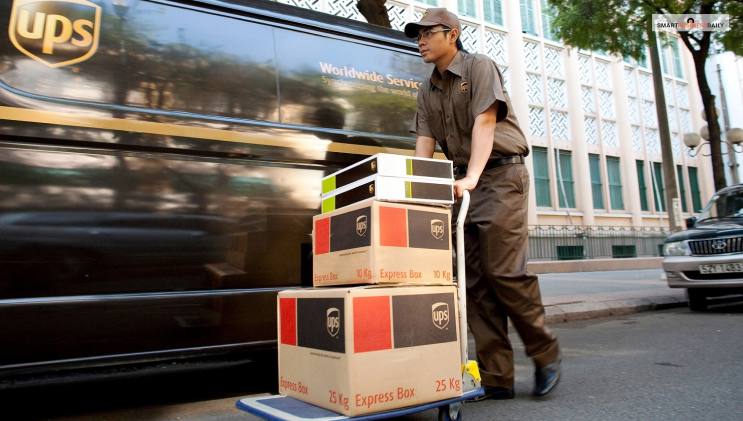
UPS stands for United Parcel Service. It is a leading company in logistics. UPS is capable of delivering more than 20 million packages every day. They have also created application platforms to offer better data insight and scheduling insight. The company decided to create a new application platform.
They aim to offer the best delivery service to their customers. Optimized package services using a cloud-based application platform is the aim of UPS services. A massive number of 534,000 work under them. UPS offers its services to 220+ countries. In 2025 UPS generated $88.7 billion in revenue.
What Does Label Created Means In UPS?
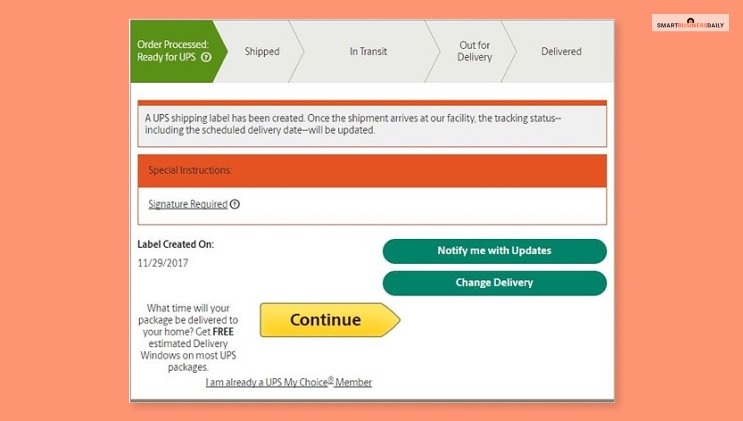
UPS offers shipment details and updates on request. They will usually send you an email with a UPS label created notification. The notification will show you that a UPS Returns or UPS Import ControlSM was created by the shippers.
Upon request, United Parcel Service will provide an email notification indicating that a UPS Import ControlSM or UPS Returns® shipment label was created by your shipper.
The label-creation notification email will include a tracking number for each package. Check out for the billable weight. Itwill help you to understand how much your freight budget should be.
If you are getting this notification, then it only means that a shipping label has been created. It also means that the payment for your item’s shipment has been made already. Also, your product is waiting for its first “in-transit” scan. Your product might stay in this condition for one or two business days.
UPS delivery provides this service free of cost and does not put any additional charge. Also, the service’s availability also depends upon the country you are in and the country of your product’s delivery.
What Happens After The “Label Created” Sign Appears?
Yes, this status is completely normal. In most cases, it appears before UPS physically has your package. The seller creates the label first. The box is packed later. Pickup happens after that.
Here is what usually happens next:
- The seller hands the package to UPS
- UPS scans it at pickup or at a sorting center
- The status changes to “On the Way”
Until that first scan happens, tracking will not move. This step often depends on the seller’s schedule rather than UPS’s.
Why Is The Order Tracking Status Stuck On UPS Label Created?
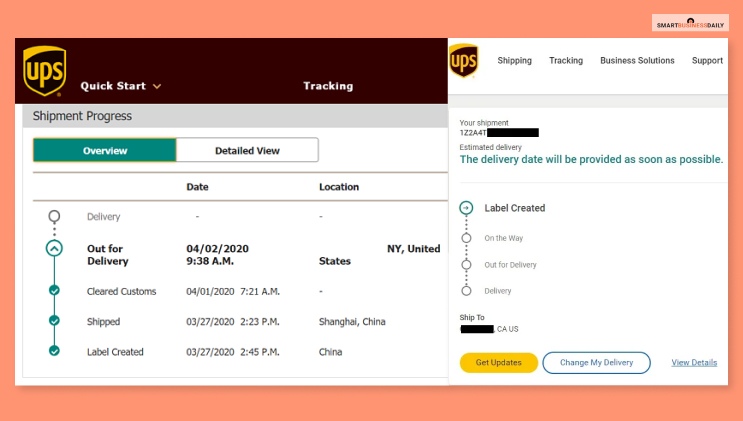
You might wonder why your order tracking status is only stuck at one point where it shows the label created. This notification means that the shipment of your order has been paid for.
The carrier has yet to scan the package in its first transit. It might also mean that the UPS label was created but not shipped.
Usually, this phase does not last long. However, sometimes, your package might stay in the label-created status for one or two days.
How Long Is Too Long? When You Should Actually Be Concerned
In most cases, there is no reason to panic. A UPS label created status can stay unchanged for:
- 24 hours
- 48 hours
- Even 72 hours during busy periods
This is still normal. However, you should pay attention if:
- The status does not change after 4–5 business days
- The seller has already confirmed dispatch
- There is no estimated delivery date showing
At that point, the delay is usually on the sender’s side. UPS cannot move or scan a package they do not have yet.
Does “UPS Label Created” Mean My Package Was Picked Up?
No, it does not. This is a common misunderstanding. “Label Created” only means:
- Shipping details exist
- Payment is done
- Tracking is active
It does not confirm pickup. Pickup is only confirmed when UPS scans the package for the first time. Until that scan appears, UPS does not physically have the shipment.
Different Phases Of UPS Delivery
If you are expecting a package delivery from UPS, it will help to stay informed about their process. Each phase takes a specific amount of time, which adds up to an estimated delivery date on the UPS tracking page.
Label Created
“UPS Label created” is the first phase of your package’s delivery in the delivery network of UPS. It means they have the billing and shipping information.
Once they have the shipment, they will process it through the network. But before that, check for the billable weight of your package.
Shipment/On The Way
The next status of the delivery is “On The Way.” this means that UPS has already received the package and is moving it through their delivery network.
Your package is traveling a long distance at this moment and will take time to arrive at your nearest hub. However, throughout the way, your billable weight cannot alter.
Out For Delivery
When you see the “Out For delivery” notification on the UPS tracking page, it means two things Firstly, the package has already arrived in the local facility, and UPS has dispatched it for delivery.
Delivered
The UPS driver has reached your address and has either handed the product to you or kept it in a safe and plain sight.
How Long Will UPS Delay The Package Delivery?
Since the UPS label created notification is on. You also know that the product is awaiting the first in-transit scan. So, how long will this process take? So, how long can you expect your package to get delayed?
So, if you are living in the ideal world where everything happens the way you want, the shipper will ship the product as soon as the label is created. But we live in a difficult world with difficult times. Jokes aside, it will take some time before you get the product in your hand.
But you can rest assured that UPS will deliver the product as soon as they have the package in their possession. So, if you are receiving the product through UPS Ground, the product might take one to five business days before UPS delivers it to you. UPS Ground has a transit time of one to five business days, and they will deliver your product accordingly.
So, based on this fact, you could say that the time taken for the delivery can depend on how quickly the shipper hands the product to you. But you should remember that if UPS receives the package, they will not delay the delivery and reach out to you as soon as possible. The tracking option will simply display the first update of the delivery near you.
But, if the delivery expectation is keeping you on your toes, I will suggest taking a look at the estimated delivery date on the tracking page UPS. UPS keeps updating the estimated delivery date based on all the data they have at their disposal. You are likely to receive your package on or after the estimated delivery date.
UPS Label Created but No Update for Days? What To Do
If your tracking has not updated for several days, follow these steps.
Step 1: Contact the seller first
Ask if the package has been handed to UPS. This solves most cases.
Step 2: Check the pickup method
Some sellers only schedule pickups on specific days.
Step 3: Verify the tracking number
Make sure the number works on the official UPS site.
Step 4: Contact UPS only if needed
UPS support can help confirm whether the package entered their system.
In most situations, the issue is timing, not a lost parcel.
How Do You Track Your Parcel With UPS?
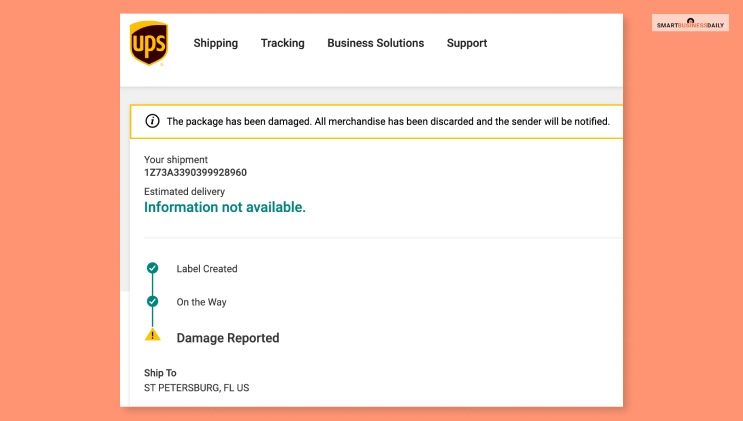
I know that this is not related to the UPS label created notification you were getting. I have already answered that part. But, if you want help tracking your parcel with UPS, then these steps might be helpful –
- While sending a shipment, UPS will generate a tracking number.
- The customer has to use the tracking number in the tracking field of the company’s website.
- When booking your delivery services with Eurosender, customers receive a tracking number through their email. They can use that to track their delivery online.
Is UPS Label Created Different for International Shipments?
Yes, international shipments can behave differently. For international deliveries:
- Labels may be created days before export
- Customs documents may delay scanning
- The package may be held by the sender longer
It is common for international shipments to stay in the label created stage slightly longer than domestic ones. This does not mean anything is wrong. Once the export scan happens, updates usually appear quickly.
How To Create Shipping Label In UPS?
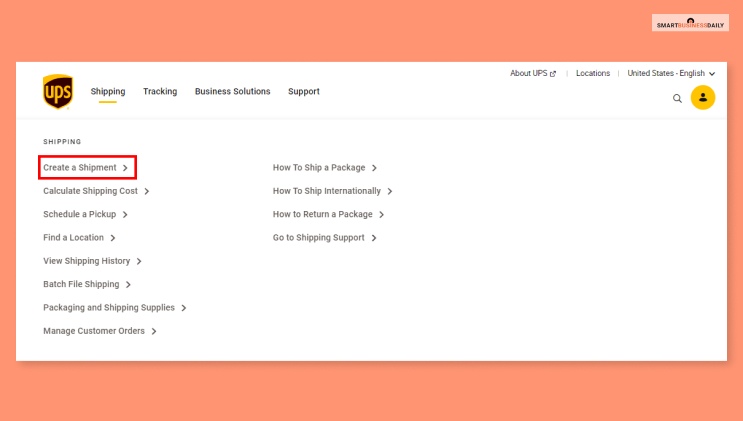
The meaning of the UPS label created should be clear to your now. However, if you want to create a label yourself, then here are the steps you can take –
- First, go to UPS.com. Now select the “Create a Shipment” option from the shipping tab.
- Now, you have to enter your address and name in the “Ship from.” Then you have to fill up the address of the recipient from the “Ship To” section.
- Now, you have to provide the package information and select the service option that matches your delivery needs.
- Now the next point is about choosing your preferred payment method and printing your label accordingly.
Read Also: Tendered To Delivery Service Provider – What Do You Mean By It?
Frequently Asked Questions (FAQs):
I think you have found the answers you were looking for. However, since I would love to offer a little extra, here are some additional questions and answers you might want to read.
You might wonder what it means to get a UPS label created notification. They receive the billing information and shipment details from the sender of a package. When the shipping company has the item in their possession and circulating in their network, they update the delivery status.
If you see the “Label Created” status, then it means that the payment for your shipment is already made. It also means that the shipment is waiting for the “in-transit” scan by the carrier. Sometimes the shipping status can stay in the “Label Created” stage for more than one business day.
I understand how hard it is to wait for your package to finally be delivered. But, most (almost 90%) UPS ground packages take at least three days to finally reach your doorstep.
The best part of UPS delivery service is that they update their delivery location and status every 2 or 3 minutes during delivery. You can track your delivery minute-by-minute on your smartphone or desktop.
Yes, your packages also travel on weekends if you are taking delivery service from UPS. They offer delivery service from Monday to Tuesday for both residential and commercial packages. You can expect your residential packages to be delivered on a Sunday.
Is Your UPS Label Created?
UPS label created is a simple shipping label creation notification. But when your label is created, you need to check your billable weight almost immediately.
Customers often get this notification when they choose UPS as their delivery system. I think reading this article was worth it and you have found the answer to your questions.However, if there are any further queries related to the same, then you should ask questions in the comment section. We will try to get back to you as soon as possible.
Read Also:




Related Articles
Comments Are Closed For This Article