








How Automation In Customer Service Can Elevate Customer Satisfaction?
11 Mins Read
Published on: 02 November 2024
Last Updated on: 15 June 2026

- What Does Automation In Customer Service Mean?
- How Automation In Customer Service Can Elevate Customer Satisfaction?
- 1. Automation Makes The Entire Customer Support Experience Engaging:
- A) Faster And More Consistent Communication:
- B) Immediate Support When Customers Need It:
- C) Quicker Problem Detection:
- D) Helping Customers Solve Issues On Their Own:
- 2. Automation Escalates Issues Or Offers A Solution:
- A) Automatic Ticket Creation And Updates:
- B) Real-Time Ticket Tracking:
- C) Collecting Feedback Without Losing Context:
- 3. Assists Human Agents With Context, Relevance, And Priority:
- A) A Complete View Of Every Customer Interaction:
- B) Faster Handling Of Urgent Problems:
- C) Smart Routing To The Right Team:
- D) Helping Agents Resolve Issues Quickly:
- Use Cases And Examples Of Using Automation In Customer Services:
- 1. Ticketing And Escalation:
- Real-World Example:
- 2. Call Routing:
- Real-World Example:
- 3. Interactive Voice Response:
- Real-World Example:
- 4. Centralized Support:
- Real-World Example:
- Benefits Of Incorporating Automation In Customer Service:
- 1. Speeds Up Response Times:
- 2. Provides 24/7 Support:
- 3. Improves Accuracy And Consistency:
- Potential Drawbacks Of Using Automation In Customer Service:
- 1. Lack Of Personalization:
- 2. Handling Complex Issues:
- 3. Emotional Connection:
- 4. Frustration With Repetitive Queries:
- 5. Setup And Maintenance:
- 6. Potential For Errors:
- How To Create A Personal Touch For Customers?
- Using Automation In Customer Support? Best Practices
- Use Automation In Customer Service To Elevate Customer Satisfaction:
Now more than ever, customers want answers to their concerns instantly, and they turn to businesses to get them.
As companies strive to meet this demand, automation has emerged as an important approach to enhancing customer satisfaction.
Automating interactions with clients allows businesses to respond faster and handle more inquiries while remaining personal and timely, thereby making clients happy.
Now, let us take a look at how automation in customer service helps elevate the customer experience and provide better service to clients.
What Does Automation In Customer Service Mean?
Automation in customer service refers to the dependency on technology for simplifying tasks such as transaction processing, customer data management, and inquiry resolution, without any direct human interference or involvement.
Moreover, automation in the customer service landscape relies entirely on advanced tech like robotic process automation, machine learning, and AI to drive more personalized and smarter interactions with clients.
On this note, I’ve laid out the most common automation tools for customer service – that way, you will have a fair idea of how common these tools are in real-life scenarios.
| Tool | Purpose |
| Live Chat Automation and Chatbots | AI-powered tools and software solutions that offer quick responses and seamless transfer of the right queries to human agents. |
| Self-Service Portals | Digital platforms with knowledge bases, troubleshooting guides, and FAQs that help customers to independently resolve issues. |
| Survey and Feedback Tools | Platforms like SurveyMonkey and Qualtrics obtain and analyze feedback from customers to identify trends and boost quality of service. |
| Cloud Contact Center Software | Centralizes client interactions with AI to track conversations, analyze performance, and route inquiries in real-time. |
| Ticketing Systems and CRMs | Integrated solutions which auotmate ticketing workflows, offer personalized customer support, and centralize client data. |
How Automation In Customer Service Can Elevate Customer Satisfaction?
Automation in customer service leverages diverse and intelligent tools and software solutions to simplify and streamline customer interactions.
This, in turn, allows businesses and brands to resolve problems faster and offer immediate support. On that note, here’s how customer support automation works:
1. Automation Makes The Entire Customer Support Experience Engaging:
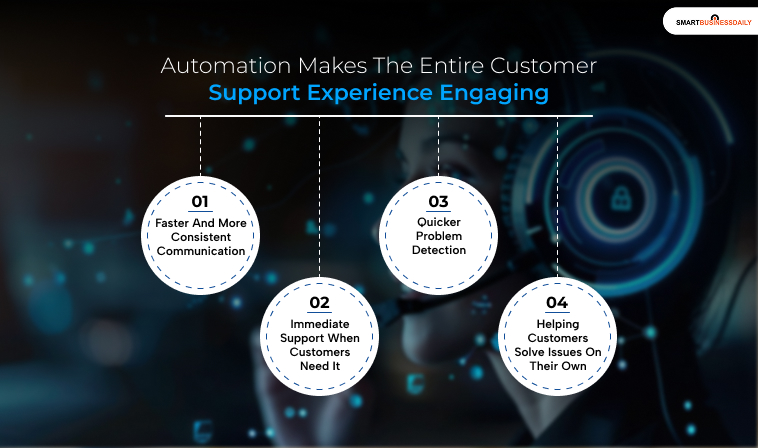
With automation, you can enhance the entire customer support experience by offering streamlined and immediate support, even when nobody from your team is free.
So, here’s how this works out:
A) Faster And More Consistent Communication:
Automation helps businesses respond to customers quickly across email, live chat, and support portals. Customers do not have to wait hours for basic updates or responses.
B) Immediate Support When Customers Need It:
The moment someone lands on your support page, chatbots can ask what went wrong and guide them toward the next step.
Moreover, this gives customers instant help instead of making them search around for answers.
C) Quicker Problem Detection:
Customer support automation tools can scan conversations for phrases like “connection problem” or “error message.”
As a result, with NLP, they understand the issue and pull relevant solutions from your help center or FAQ database.
D) Helping Customers Solve Issues On Their Own:
Automation can walk users through simple fixes, such as resetting a password or troubleshooting Wi-Fi problems.
Also, for more detailed issues, it can direct them to helpful guides and knowledge base articles so they can find answers without waiting for a support agent.
2. Automation Escalates Issues Or Offers A Solution:
When a problem cannot be resolved immediately, most customer support automation solutions direct clients to the next steps.
Now, this generally includes:
A) Automatic Ticket Creation And Updates:
If the issue is not resolved right away, the system automatically creates a support ticket.
Customers then receive a confirmation email with the ticket number and an estimated response time, so they know their request is being handled.
B) Real-Time Ticket Tracking:
Automated follow-ups keep customers informed about the status of their support requests. Many systems also allow users to track progress through a self-service portal without contacting support again.
C) Collecting Feedback Without Losing Context:
Once the issue is escalated or resolved, automated messages can ask customers to rate their experience.
At the same time, the system keeps the full conversation history and issue details available for support agents, which helps avoid repeated explanations and speeds up resolution.
3. Assists Human Agents With Context, Relevance, And Priority:
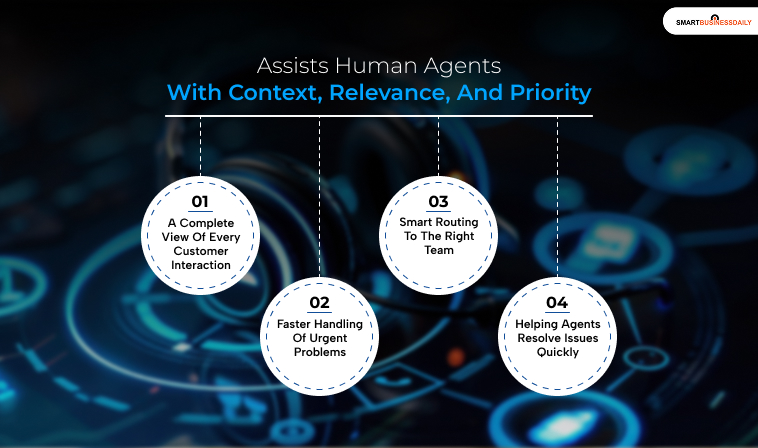
Automation provides context and relevant information from a customer engagement upfront, which, in turn, enables support teams to solve problems more efficiently.
This usually includes:
A) A Complete View Of Every Customer Interaction:
When an issue needs human support, automation tools collect past conversations, troubleshooting steps, and customer details into a single support ticket.
This gives agents the full picture without forcing customers to explain everything again.
B) Faster Handling Of Urgent Problems:
Customer service automation software can identify and prioritize high-priority tickets automatically. Also, SLAs help teams stay on track by setting clear timelines for responses and issue resolution.
C) Smart Routing To The Right Team:
More complex issues are automatically sent to the appropriate department, whether that is billing, technical support, or account management.
This reduces delays and helps customers reach the right experts faster.
D) Helping Agents Resolve Issues Quickly:
Since agents already have the customer’s history and issue details in front of them, they can take action immediately.
That could mean processing a replacement, troubleshooting remotely, or resolving the issue without asking repetitive questions.
Use Cases And Examples Of Using Automation In Customer Services:
I think I have offered a lot of clarity on how using automation in customer service can boost your overall team productivity and efficiency while elevating client satisfaction.
On that note, here are a few instances to show how to use automation across various customer support contexts:
1. Ticketing And Escalation:
Automated support systems can sort incoming tickets based on urgency, issue type, and complexity.
Moreover, critical problems are then routed to the appropriate support agents immediately, helping businesses resolve issues faster and improve the overall customer experience.
Real-World Example:
An e-commerce company uses automation for organizing support tickets.
As a result, if a customer reports a failed payment or billing issue, the system marks it as high priority and routes it to the appropriate team right away.
Meanwhile, less urgent requests, like product questions or delivery updates, are placed in separate queues. This helps support teams focus on time-sensitive problems first and reduce response times.
2. Call Routing:
Automation can use skill-based call routing to connect customers with the right support agent depending on their needs.
Moreover, the system can route calls by department, product expertise, technical knowledge, or even language preference.
This helps customers get relevant support faster instead of being transferred between multiple teams.
Real-World Example:
A telecom company uses skills-based routing to connect international customers with agents who speak their preferred language.
Instead of bouncing between departments, customers reach the right person immediately, reducing wait times and leading to quicker resolutions.
Fast support matters more than ever. According to CX trends, 85% of consumers say short wait times are an important part of a good customer support experience. (Source: Zoom)
3. Interactive Voice Response:
IVR (Interactive Voice Response) systems help customers via automated self-service options so they can handle simple tasks without waiting for a support agent.
Moreover, these systems can decrease call volumes, answer common queries, and direct clients to the right type of support when additional help is needed.
Real-World Example:
With the help of IVR, a bank helps clients to check their account balance, transfer funds, or pay bills through automated phone prompts.
Since customers can complete these basic tasks on their own, support agents have more time to focus on complex issues that require human assistance.
This improves efficiency for the business while also reducing wait times for customers.
4. Centralized Support:
This one is specifically applicable to multinational operations.
So, for any business that works with a diverse group of clients, automation tools offer multilingual support. And that too without involving several support teams from different locations.
Real-World Example:
A global software company uses an AI chatbot that can communicate in multiple languages.
This allows customers from different countries to get support in their preferred language without waiting for a human agent.
As a result, the company can deliver faster and more consistent customer service while also reducing support costs and saving time for its teams.
Benefits Of Incorporating Automation In Customer Service:

Automation in customer service offers several advantages that enhance both efficiency and customer satisfaction.
They enable businesses to handle repetitive inquiries, provide after-hours support, and maintain consistency in messaging.
When integrated with marketing automation tools, automated response systems can even send targeted messages that align with a customer’s past interactions and preferences.
For instance, automated responses can instantly confirm a customer’s inquiry, share additional information, or guide them through the next steps—providing a seamless, personalized experience.
By automating basic queries, customer service agents are freed up to handle more complex issues, improving efficiency and ensuring that each customer receives prompt attention.
1. Speeds Up Response Times:
Response speed is always an important issue in customer interactions.
That is, customers who arrive at answers promptly tend to be more satisfied with such service and, therefore, more likely to stick to a specific brand.
Some examples where automation in customer service is useful include providing instant responses to frequently asked questions about a product, responding when an order is placed, or answering questions about when the business is open, to avoid keeping the customer waiting for long.
With the help of automation instances, one can organize it so that most questions are answered automatically, while the complex ones are forwarded to the right staff.
This will prevent customers from waiting long without information, as the system will give them continuous updates.
2. Provides 24/7 Support:
People may have queries after working hours, and bots ensure that none of them go unanswered.
Through chatbots for real-time or text conversations, businesses can also operate 24/7 via SMS and email.
When customers have questions about the status of an order or the specifics of a product, they receive prompt replies that keep them engaged with the brand.
A crucial marketing automation point in this regard is that it can even generate sensible answers tailored to customer interaction history.
These responses appear very individual and immediate, even in an automated context, which must improve the overall support experience and the brand’s confidence.
3. Improves Accuracy And Consistency:
When using conventional approaches, companies must accept that there may always be mistakes or inconsistencies in answers.
Automation eliminates this risk by ensuring that each customer receives the right information at all times.
Moreover, by automating customer service, we can maintain day-to-day data on:
a) Frequently asked questions.
b) Company procedures.
c) Other relevant product information, thereby ensuring that each reply is as factual as possible.
Furthermore, with automation, it becomes easier to update responses across the company whenever a new policy or product is introduced.
This constant updating of information ensures that all customers are adequately attended to.
This, in turn, improves their credibility and fosters customer confidence.
Potential Drawbacks Of Using Automation In Customer Service:
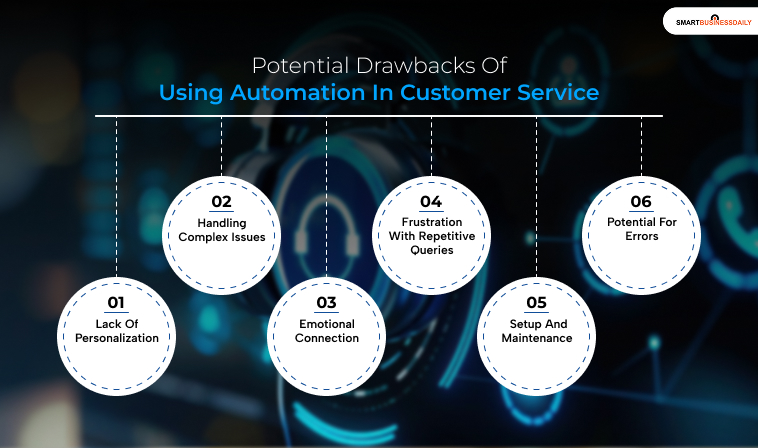
Yes, while automated response systems in customer service offer many benefits, there are also some potential drawbacks and limitations to consider:
1. Lack Of Personalization:
Automated systems can struggle to provide the personalized touch that human agents offer. This can make interactions feel impersonal and generic.
2. Handling Complex Issues:
These systems are often limited to handling simple, straightforward queries.
More complex issues may require human intervention. This can lead to frustration if the customer feels their problem isn’t a priority.
3. Emotional Connection:
Automated responses lack the empathy and emotional understanding that human agents can provide. This can be particularly important in situations where customers are upset or need reassurance.
4. Frustration With Repetitive Queries:
Customers can become frustrated if they receive repetitive or irrelevant responses from automated systems, especially if their issue is not resolved quickly.
5. Setup And Maintenance:
Implementing and maintaining automated systems can be time-consuming and costly. It requires ongoing updates and monitoring to ensure the system remains effective and accurate.
6. Potential For Errors:
Automated systems can sometimes misinterpret customer queries, leading to incorrect or unhelpful responses. This can negatively impact customer satisfaction and trust.
How To Create A Personal Touch For Customers?

Contrary to the claim that people are more valuable than automated response systems in customer service, using AI tools like Natural Language Processing makes the process much simpler and more personalized.
Machine learning can help group customers and store their records, enabling automated feedback based on their options, buying behavior, and prior communications.
This level of personalization is useful not only in establishing long-term relationships with customers but also in conducting relevant conversations with each customer.
Thanks to marketing automation tools, it’s possible to create process segments that release specific messages or promos based on the client’s actions.
For example, a follow-up a client receives after buying a certain product includes information relevant to that product, recommendations related to it, and so on.
You can easily program an AI chatbot to carry out these tasks. Moreover, the conversation flows persistently, and it seems highly personal and thoughtful from the company side.
Using Automation In Customer Support? Best Practices
To enhance internal efficiency and customer satisfaction, here’s my list of best practices and tips to make the most of your customer support automation strategy.
1. Prioritize smooth integration with all your tools, especially your CRM. This is because automation is only properly effective when you ensure it is working seamlessly with all existing systems. The point? To unify and streamline the overall customer experience.
2. Gather customer feedback and then act on it. So, just become proactive about gathering feedback from your clients – now, analyze the feedback and act on it to improve the overall customer experience. Also, do this regularly to show how serious you are about improving the quality of customer support.
3. Train anyone working with you on how to use automation tools. Moreover, this is especially true for all customer-facing teams – these teams should get enough training on using automation efficiently for customer support. The point? To make the most of automation and deliver an exceptional service.
4. Track performance regularly and, on the basis of your observations, optimize the entire automation process. Remember, ongoing monitoring can help you align automation with your SMART goals and adapt to evolving needs in the customer support landscape.
5. Balance human intervention with automation. As a result, while automation drives efficiency, human interference is crucial for creating meaningful relationships and ensuring every client feels valued and, more importantly, understood.
Use Automation In Customer Service To Elevate Customer Satisfaction:
E-mail automation is one of the most effective solutions for current companies to improve customer satisfaction and optimize applications.
The use of marketing automation consequently enables businesses to offer prompt, professional, and personalized customer care, as expected by the modern consumer.
Furthermore, the use of autoresponders not only hastens exchanges but also makes support available around the clock. This reduces the likelihood of errors and fosters more individualized relations.
Automation in customer service is a great idea for companies that care about their clients.
This is because it will help increase customer loyalty, improve the product or service provided, and lay the foundation for effective future development.
Read Also:




Related Articles



Comments Are Closed For This Article